2026

MuddyHands

A solo 5-day design sprint exploring how potters document work with muddy hands

Role

Product designer

Duration

5 days

Tools

Figma

Figma Make

v0

Live Demo

Muddy Hands

TL;DR

MuddyHands is a voice-first documentation tool for potters. Designed and prototyped in a 5-day solo design sprint, the project explores how separating capture from reflection can preserve creative flow while still supporting meaningful learning.

PROBLEM

Potters can’t reliably document their making process while working with wet clay. Typing, photographing, or organizing notes interrupts flow and is often physically impossible, causing process insights to be forgotten or lost.

Potters can’t reliably document their making process while working with wet clay. Typing, photographing, or organizing notes interrupts flow and is often physically impossible, causing process insights to be forgotten or lost.

Potters can’t reliably document their making process while working with wet clay. Typing, photographing, or organizing notes interrupts flow and is often physically impossible, causing process insights to be forgotten or lost.

SOLUTION

MuddyHands enables one-tap voice capture during making and defers editing, summarization, and curation to a later reflection phase. By separating capture from sense-making, the app preserves creative flow while still producing meaningful, organized documentation.

LET'S SOLVE THIS PROBLEM IN 5 DAYS.

inspired by Sprint by Knapp et al.

PROBLEM SPACE

I defined the problem scope for this app.

What makes a good potter? Practice + reflection. But

So

documentation shouldn’t happen during sense-making - it should happen around it.

POTTER JOURNEY MAP

The user journey map revealed that the core challenge wasn’t organizing information, but respecting when users are cognitively able to do so.

FLOW CHART

The flow chart revealed that effective documentation depends on separating capture from reflection and treating deletion and summarization as core parts of learning.

day 1, I built deep understanding of the problem and map the end-to-end experience. I reframed documentation as a two-phase cognitive process rather than a single task.

MVP SCOPE

I deliberately scoped MuddyHands to a narrow, behavior-focused MVP. Instead of trying to solve documentation end-to-end, I focused on the moment where most tools fail: recording process without breaking flow.

Included in the MVP

One-tap voice capture during making

Sessions to group work by time

Pieces as the unit of reflection

Review and deletion of raw notes

Explicitly out of scope

Include reference pictures during creating proces

Image capture during making

Social sharing or collaboration

Moving session to trimming/glazing phrases

By cutting these early, I protected the core behavior the product was meant to test.

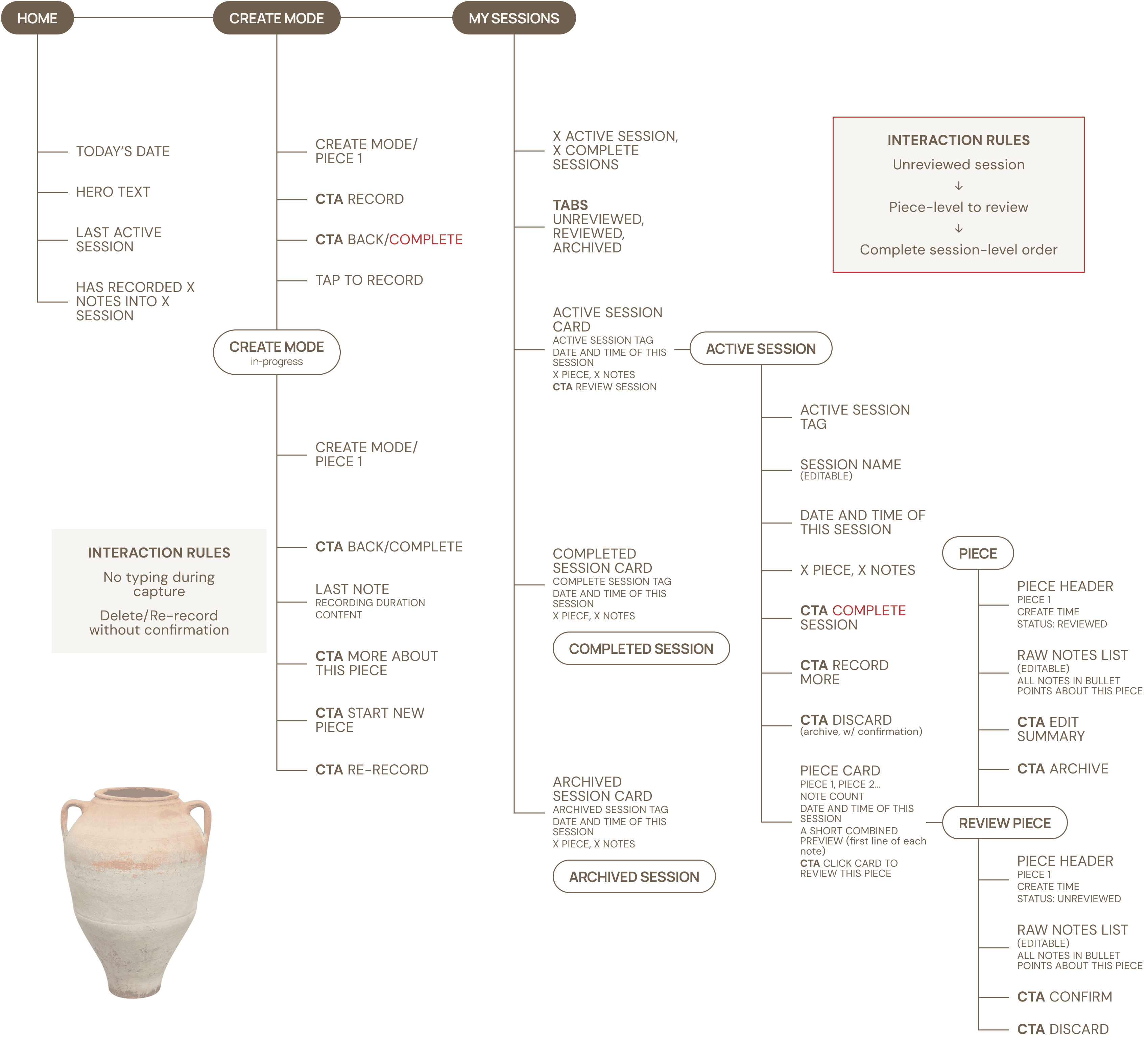
IA

With the scope locked, I designed the information architecture around cognitive state, not features.

By cutting these early, I protected the core behavior the product was meant to test.

SKETCHING

&

ITERATIONS

With the IA, I started exploring the range of possible experiences.

Sketching the possible flows, I noticed some confusing spots.

Clarifying Actions vs. System States

Problem: During sketching, the flow used the word “complete” in multiple ways—some as user actions and others as system statuses—creating unnecessary cognitive load and ambiguity about what was actually happening.

Solution: I separated actions from system states. “Done” explicitly ends the capture phase, “Active” signals a session is open for reflection or continued recording, and “Completed” represents intentional closure. Reducing overlapping labels clarified the flow and made each stage easier to understand at a glance.

Making Reflection Optional, Not Obligatory

Problem: The initial design required users to review pieces one by one before completing a session, turning reflection into a checklist and making it feel like work—especially when multiple sessions existed.

Solution: I removed mandatory review flows and reframed reflection as optional and self-directed. Users can edit notes, add thoughts, or skip reflection entirely. This shift reduced friction and positioned reflection as an opportunity for learning rather than a task users must finish.

By the end of Day 2, I translated the MVP scope and information architecture into sketches, iterating on clarity by separating actions from system states and removing mandatory review flows to keep reflection flexible and low-pressure.

DAY 3

inspired by Sprint by Knapp et al.

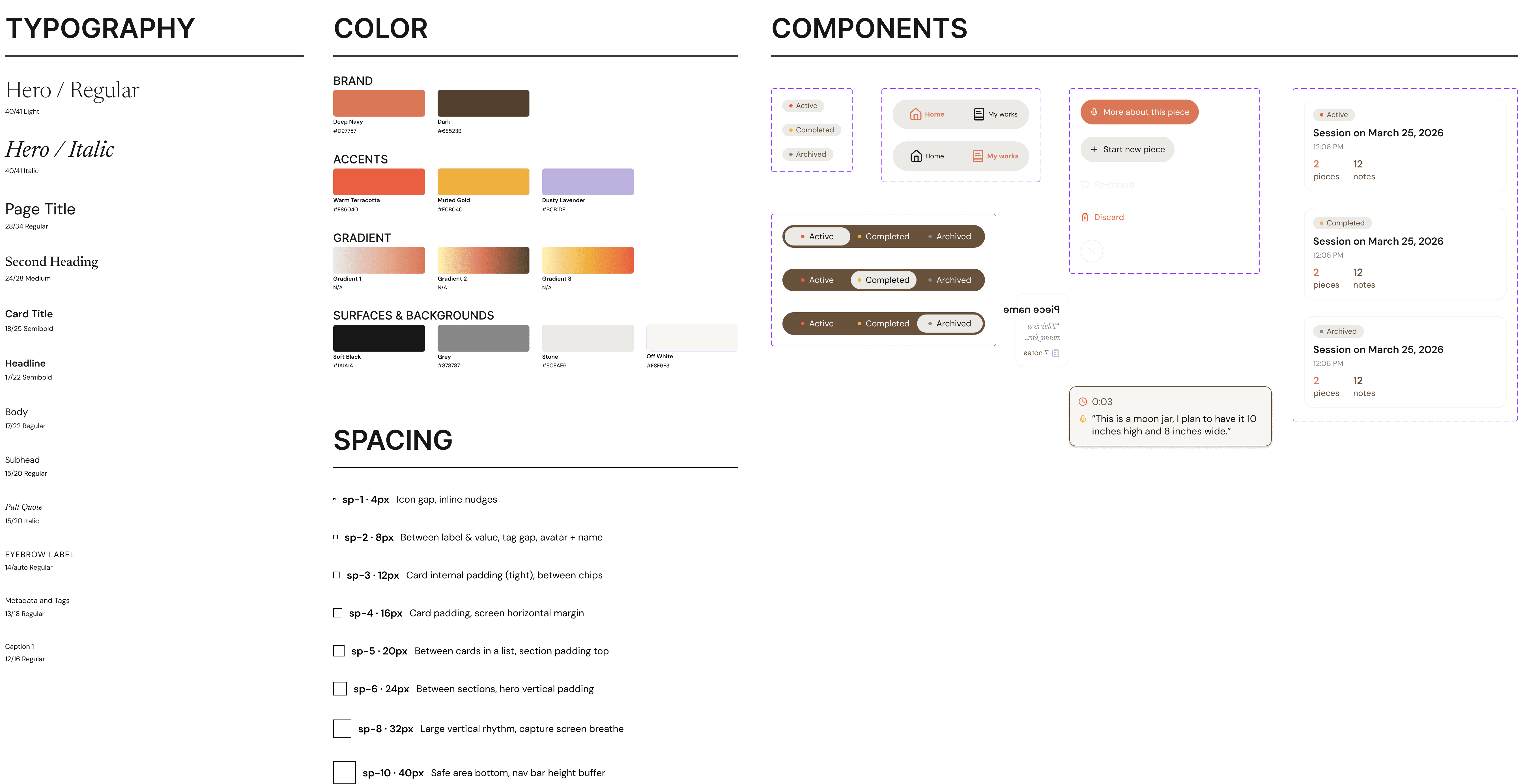
DESIGN SYSTEM

The flow chart revealed that effective documentation depends on separating capture from reflection and treating deletion and summarization as core parts of learning.

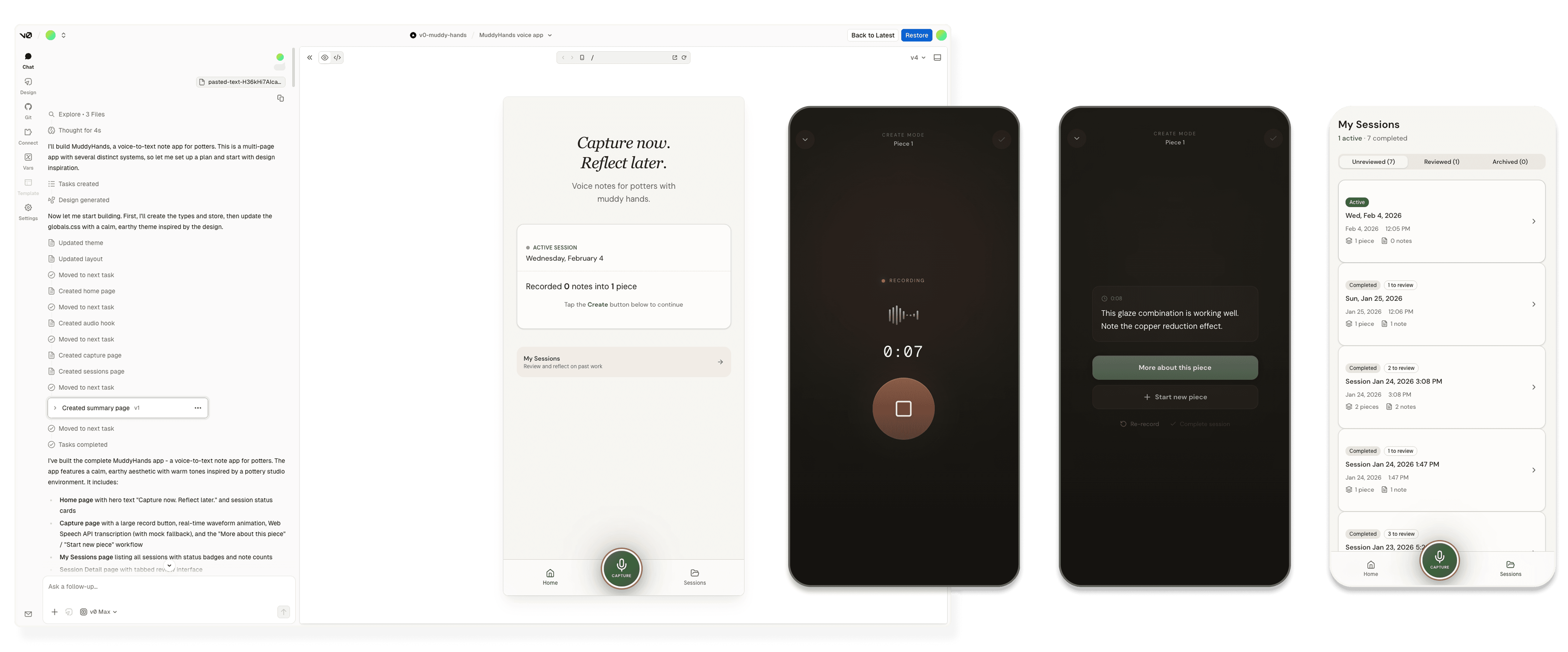
HI-FI WIREFRAME

MuddyHands is a voice-first documentation tool for potters. Designed and prototyped in a 5-day solo design sprint, the project explores how separating capture from reflection can preserve creative flow while still supporting meaningful learning.

v0 -> FIGMA MAKE

MuddyHands is a voice-first documentation tool for potters. Designed and prototyped in a 5-day solo design sprint, the project explores how separating capture from reflection can preserve creative flow while still supporting meaningful learning.

DAY 4

inspired by Sprint by Knapp et al.

TESTING

MuddyHands is a voice-first documentation tool for potters. Designed and prototyped in a 5-day solo design sprint, the project explores how separating capture from reflection can preserve creative flow while still supporting meaningful learning.

IA

MuddyHands is a voice-first documentation tool for potters. Designed and prototyped in a 5-day solo design sprint, the project explores how separating capture from reflection can preserve creative flow while still supporting meaningful learning.

CONCEPT VALIDATION

MuddyHands is a voice-first documentation tool for potters. Designed and prototyped in a 5-day solo design sprint, the project explores how separating capture from reflection can preserve creative flow while still supporting meaningful learning.

DAY 5

inspired by Sprint by Knapp et al.

FINAL DESIGN

MuddyHands is a voice-first documentation tool for potters. Designed and prototyped in a 5-day solo design sprint, the project explores how separating capture from reflection can preserve creative flow while still supporting meaningful learning.

HI-FI WIREFRAME

MuddyHands is a voice-first documentation tool for potters. Designed and prototyped in a 5-day solo design sprint, the project explores how separating capture from reflection can preserve creative flow while still supporting meaningful learning.

v0 -> FIGMA MAKE

MuddyHands is a voice-first documentation tool for potters. Designed and prototyped in a 5-day solo design sprint, the project explores how separating capture from reflection can preserve creative flow while still supporting meaningful learning.

LET'S SOLVE THIS PROBLEM IN 5 DAYS.

inspired by Sprint by Knapp et al.

THE SPRINT SET UP

Research includes survey, focus group, expert interview, and competitive analysis.

Residents

The sprint setup

  • Format: Solo design sprint (inspired by Sprint by Knapp et al.)

  • Duration: 5 days

  • Constraint: Design, prototype, and test with real potters

  • Role: Product designer, researcher, facilitator, and builder (me)

Instead of a team sprint, this was a self-facilitated sprint, with daily goals and tight scope.

The sprint setup

  • Format: Solo design sprint (inspired by Sprint by Knapp et al.)

  • Duration: 5 days

  • Constraint: Design, prototype, and test with real potters

  • Role: Product designer, researcher, facilitator, and builder (me)

Instead of a team sprint, this was a self-facilitated sprint, with daily goals and tight scope.

"If a friend recommends a place, I’ll check it out—but otherwise I don’t really see small businesses unless I drive by them."

Liam T., Local resident

Business owners

struggle to promote themselves online due to budget or technical limitations.

struggle to promote themselves online due to budget or technical limitations.

"I just start my business 2 months ago, and the budget for online ads is $1500 per month already. Now I try to go to local events as much as possible for better visibility and possible collaborations."

Julia M., Owner of Adaptive Chiropractic

Local schools and nonprofit organizations

also lack easy access to business sponsors for their community events.

also lack easy access to business sponsors for their community events.

"We’re always looking for sponsors for our events, and most of our current sponsors are from our parents’ network."

Toby M. Orchestra Director at Howard High School

Existing platforms

like Yelp or Google Maps do not meaningfully connect local businesses with community organizations or residents.

like Yelp or Google Maps do not meaningfully connect local businesses with community organizations or residents.

Full analysis

WHAT HAPPENED,
AND WHY.

WHAT HAPPENED,
AND WHY.

WHAT HAPPENED,
AND WHY.

Research includes survey, focus group, expert interview, and competitive analysis.

Research includes survey, focus group, expert interview, and competitive analysis.

Research includes survey, focus group, expert interview, and competitive analysis.

Residents
Residents
Residents

find it difficult to discover nearby small businesses, events, or local initiatives.

find it difficult to discover nearby small businesses, events, or local initiatives.

find it difficult to discover nearby small businesses, events, or local initiatives.

"If a friend recommends a place, I’ll check it out—but otherwise I don’t really see small businesses unless I drive by them."

"If a friend recommends a place, I’ll check it out—but otherwise I don’t really see small businesses unless I drive by them."

"If a friend recommends a place, I’ll check it out—but otherwise I don’t really see small businesses unless I drive by them."

Liam T., Local resident

Liam T., Local resident

Liam T., Local resident

Business owners
Business owners
Business owners

struggle to promote themselves online due to budget or technical limitations.

struggle to promote themselves online due to budget or technical limitations.

struggle to promote themselves online due to budget or technical limitations.

"I just start my business 2 months ago, and the budget for online ads is $1500 per month already. Now I try to go to local events as much as possible for better visibility and possible collaborations."

"I just start my business 2 months ago, and the budget for online ads is $1500 per month already. Now I try to go to local events as much as possible for better visibility and possible collaborations."

"I just start my business 2 months ago, and the budget for online ads is $1500 per month already. Now I try to go to local events as much as possible for better visibility and possible collaborations."

Julia M., Owner of Adaptive Chiropractic

Julia M., Owner of Adaptive Chiropractic

Julia M., Owner of Adaptive Chiropractic

Local schools and nonprofit organizations

also lack easy access to business sponsors for their community events.

also lack easy access to business sponsors for their community events.

also lack easy access to business sponsors for their community events.

"We’re always looking for sponsors for our events, and most of our current sponsors are from our parents’ network."

"We’re always looking for sponsors for our events, and most of our current sponsors are from our parents’ network."

"We’re always looking for sponsors for our events, and most of our current sponsors are from our parents’ network."

Toby M. Orchestra Director at Howard High School

Toby M. Orchestra Director at Howard High School

Toby M. Orchestra Director at Howard High School

Existing platforms
Existing platforms
Existing platforms

like Yelp or Google Maps do not meaningfully connect local businesses with community organizations or residents.

like Yelp or Google Maps do not meaningfully connect local businesses with community organizations or residents.

like Yelp or Google Maps do not meaningfully connect local businesses with community organizations or residents.

Full analysis

PAIN POINTS

Promotion is exhausting

Small husinesses and organizations alike are stretched thin trying to reach local audiences.

Discovery is broken

Residents lacka centralized, reliable source to find local business or community events.

The connection gap

Local businesses and community organizations miss natural opportunities to support and benefit from each other.

Community isn't visible

There’s no digital space that reflects the offline ecosystem of connections in Howard County.

Interview showed that residents love exploring and supporting local business, and we knew that a community platform would differentiate us from competitors while driving local spend and connections for Howard County.

Interview showed that residents love exploring and supporting local business, and we knew that a community platform would differentiate us from competitors while driving local spend and connections for Howard County.

Interview showed that residents love exploring and supporting local business, and we knew that a community platform would differentiate us from competitors while driving local spend and connections for Howard County.

Neighborly is the only platform designed specifically for local discovery, sponsorship support, and community collaboration — all in one place. Unlike traditional business directories, we diffeciate ourselve by connecting businesses with residents and community organizations to strengthen local bonds and create meaningful partnerships.

INFORMATION ARCHITECTURE

REFLECTION

Visibility isn’t just marketing - it’s access: what started as a discovery problem became much deeper: visibility is about inclusion.

Community-centered design is non-linear. Designing for a shared space required thinking beyond individual user flows and toward ecosystem balance.

Special thanks to Dr. Tim Gorichanaz for his guidance and unwavering support throughout this journey. This work would not have been possible without his mentorship.